Showing posts with label Learn. Show all posts

Monday, March 28, 2011

Windows cannot connect to the domain

Sometimes when you use a cloned machine or a virtual machine or anything that can make confusion about computer name/SID for a domain controller you will see that message and you won't be able to login to the machine with your active directory credential, one the easiest ways to solve the problem would be rejoining the machine to the domain again. if you don't know how to do that here are the steps :
  1. login with local administrator account then right click on "my computer" and select properties then select the "computer name" tab
  2. hit the change button , select the WORKGROUP radio and type a name
  3. confirm OK's all along but no restart required just now
  4. repeat the above steps but this time join the computer to desired domain (select Domain radio button instead)
  5. OK and restart

it solved my problem hope it works for you

Saturday, January 01, 2011

Hyper-V and the Hypervisor that does not run

The virtual machine could not be started because the hypervisor is not running ...
this it what I was getting when trying to run a Hyper-V virtual machine on my HP ML380 server, a quick search and the problem was found : you have to make some changes in your BIOS (that means your CPU should support virtualization), you should enable two setting in BIOS :

1- hardware-assisted data execution protection (DEP) (was enabled by default for me)
2- hardware-assisted virtualization

and keep in mind that some machines does not apply BIOS changes until it completely turned off (just a normal restart wouldn't do it)

the real problem appears when you still get the Hypervisor error after applying these settings, here comes the solution:
the problem with me was "Persian locale", I uninstalled everything about Persian in "Region and Language" section in control panel, then uninstalled the Hyper-V and then Installed it when there was only English (US) on my system, after that everything goes smooth and alright

Wednesday, December 29, 2010

How to Remove ESET Nod32 Antivirus When You Forget It's Password

Sometimes ago I managed to install a demo version of nod32 server management console and a few clients then during the initial configuration I add a simple password to make it more secure and as you may guess by the title the password did not work later so the anti virus wouldn't uninstall!.
after a few search in forums I came up to this solution :
1- open registry (Start > Run > Regedit)
2- follow the keys to this value
HKEY_LOCAL_MACHINE\SOFTWARE\Eset\Nod\CurrentVersion\Info\PackageID
3- right click and rename the PackageID thing to something else like packageID1 (you may have to restart in safe mode to be able to change the name)
4-restart and it's done, now you can uninstall it

Monday, October 20, 2008

How to Get Office Version Programmatically

one of my friend asked me this question: how to get Microsoft Word's version installed on client system?
a few searches and here is the answer so far :
1- use this VBS code [^]:
Set objWord = CreateObject("Word.Application")
Wscript.Echo "Version: " & objWord.Version
Wscript.Echo "Build: " & objWord.Build
objWord.Quit

2- find the Word application path and check the file version (C#) [^] :
read the registry key in "Software\Microsoft\Windows\CurrentVersion\App Paths" to find winword.exe key, and then in the key find Path's value that refer to exe file of Word app.
//looks inside CURRENT_USER:
RegistryKey _mainKey = Registry.CurrentUser;
_mainKey = _mainKey.OpenSubKey(
"Software\Microsoft\Windows\CurrentVersion\App Paths\\"
+ "winword.exe", false);
if (_mainKey == null)
{
//looks inside LOCAL_MACHINE:
_mainKey = Registry.LocalMachine;
_mainKey = _mainKey.OpenSubKey(
"Software\Microsoft\Windows\CurrentVersion\App Paths\\"
+ "winword.exe", false);
}
if (_mainKey == null)
throw new Exception("it does not exist!");


MessageBox.Show(
System.Diagnostics.FileVersionInfo.GetVersionInfo(
_mainKey.GetValue(string.Empty).ToString()).FileVersion);


See the reference for complete code

3- use Microsoft.Office name space in .Net [^]

just this code :

//be aware of exceptions
MessageBox.Show(
new Microsoft.Office.Interop.Word.Application().Version);

Tuesday, July 22, 2008

First 3.5 App

I hadn't have enough free space on my hard drive to install VS2008 so I did not start C#3.5 until now.lets make our first Hello World Application.
first in Console:
start your IDE, point to "File" menu and select "New" and then "Project" (I'm sure you know this so lets skip this type descriptions)
until now most of things are like older versions of VS but may some new items are added to the box like "WPF Application", in my oppinion the most intersting thing about this dialog is the ability to choose which version of framework to use,let it stay on 3.5.

BTW select "Console Application" and then. OK it's same old structure except instead of using System.Data we're using System.Linq, we will cover that later, ok what would you do in C# 2.0 for a hello world app,do it here i've added some decoration too.

it was our first .Net 3.5 App but if you want to see real changes check the Windows Apps. to start a Wpf App do what you did for Console but select "WPF Application" instead. don't know about you but in this point i'm impressed top view is design view and below is XML view. lets just say hello and do not get involved by meaning of these things, drag a label on the form it's diffrent, didn't it? right click on label and select properties it's also different find the "Content" item and change the value to "Hello World" do you notice changes on below pane?
you may want to adjust form(window) size. run project and see the result. this was a wpf app and enough for now.

Tuesday, June 17, 2008

Beginning C# 3.5

I've started C# 3.5 recently and decided to share it with you as long as i can.most of information in these posts will be from "Apress C# 2008 and .Net 3.5", I will suppose that you are familliar with programming and new to .Net 3.5.lets start with some words about the three key components of .Net : CLR, CTS, and CLS

Professional C# (Wrox Press) describe the CLR as:
Central to the .NET Framework is its runtime execution environment, known as the Common Language Runtime (CLR) or the .NET runtime. Code running under the control of the CLR is often termed managed code.

The CLR also takes care of a number of low-level details such as memory management; creating application domains, threads, and object context boundaries; and performing various security checks.

CTS or Common Type System describes data types and programming constructs supported by the runtime there is a related feature named Common Language Specification (CLS) that defines a subset of common types and programming constructs that all .NET programming languages can agree on

besides of this .Net included a base class library that provided a very usefull featues and services like threading or I/O operations
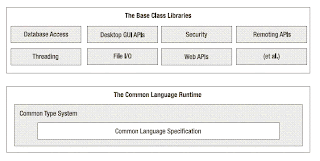
(image from the book)

anoher point that you should notice is .Net executables are not ready to use in target machine(that is why you need to have .Net Framework on target machine unlike unmanaged programs) , C# compiler do not produce final machine code but an intermediate code (like java bitecodes) - ragardless of source code's used language - called IL or MSIL, CLR makes final decisions about what and how our code will acts depending to program and target machine enviroment(that means more optimized code becauese CLR knows target CPU and generates more friendly machine codes)

Wednesday, June 11, 2008

How to Deploy Your Database along with Your App

I can recommend several ways to deploy your database along with your app
  • easiest way is using some application like Red-Gate SqlPackeger or Easy SQL Deploy Plus . if you don't have time or you are afraid of forgetting something use these software they have a good trial time so you can choose with eyes wide open. with this tools you can even insert pre required data in tables.
  • You can use database scripting to create a new database on the destination machine. after getting the script run it using your desired language, for example by SqlCommand on .Net, remember there should be some order in executing the queries, for example you should create database first then tables,views,stored procedures. the order can be different on different situations for example if you have any user defined data type that used in a table you should create it before creating table, be careful about function and other things. do not forget to insert data if necessary by some INSERT command
  • Another possible way is using attach/detach feature, right click on your database name and from Tasks 's submenu select Detach... and then OK, make sure you know the location of files before detaching. now we should attach it on destination machine if destination machine has management studio or any other tool for attaching database on it just use them another way to attach database is coding, create a WinApp/ConsoleApp in your desired language and using "CREATE DATABASE" attach your database.do not use "sp_attach_db" because it will be removed in a future version of Microsoft SQL Server. one of the benefits of this method is transfering every thing(almost) to distination db like table data or CLR related things
  • You can also use backup/restore feature to deploy your database. take a backup of database (in the management studio right click on the database and select Tasks and then backup... hit the Add button, select where to save backup file and then OK) like the attach/detach you can use management studio and other tools to restore database on destination machine, if you using management studio right click on databases node and select Restore Database... enter the database name in "to database" field select from device, click the browse button that is indicated by "..." click Add button select your file (the backup file) hit the OK in "Restore Database" dialog check the database you have selected and then OK. for doing this programatically you can just use RESTORE DATABASE . like the last method most of your database info will be transfered to destination machine.